 Ariel Diaz
Introducing HumanwareOS
A Slack-first operating system for directing AI agents without carrying every session in your head.
Intro
Ariel Diaz, serial entrepreneur—and the first user
I have spent my career building software companies and operating teams. HumanwareOS began as an opinionated system for my own work: a way to run AI agents without turning their growing capability into a new kind of management overhead.
Challenge
Agents inverted computing. They also raised the cognitive load.
Traditional software made people learn the machine's language and work around its structure. Agents reverse that relationship: the computer can finally understand our language and work for us. But coordinating many capable agents is more cognitively demanding than using one tool.
I tried Conductor, Superset, Paperclip, and a workflow built in Notion. Each solved part of the problem, but the friction moved rather than disappeared: too many sessions, interfaces, notifications, and states to hold in my head.
Solution: Slack
Use the interface that already knows how teams work
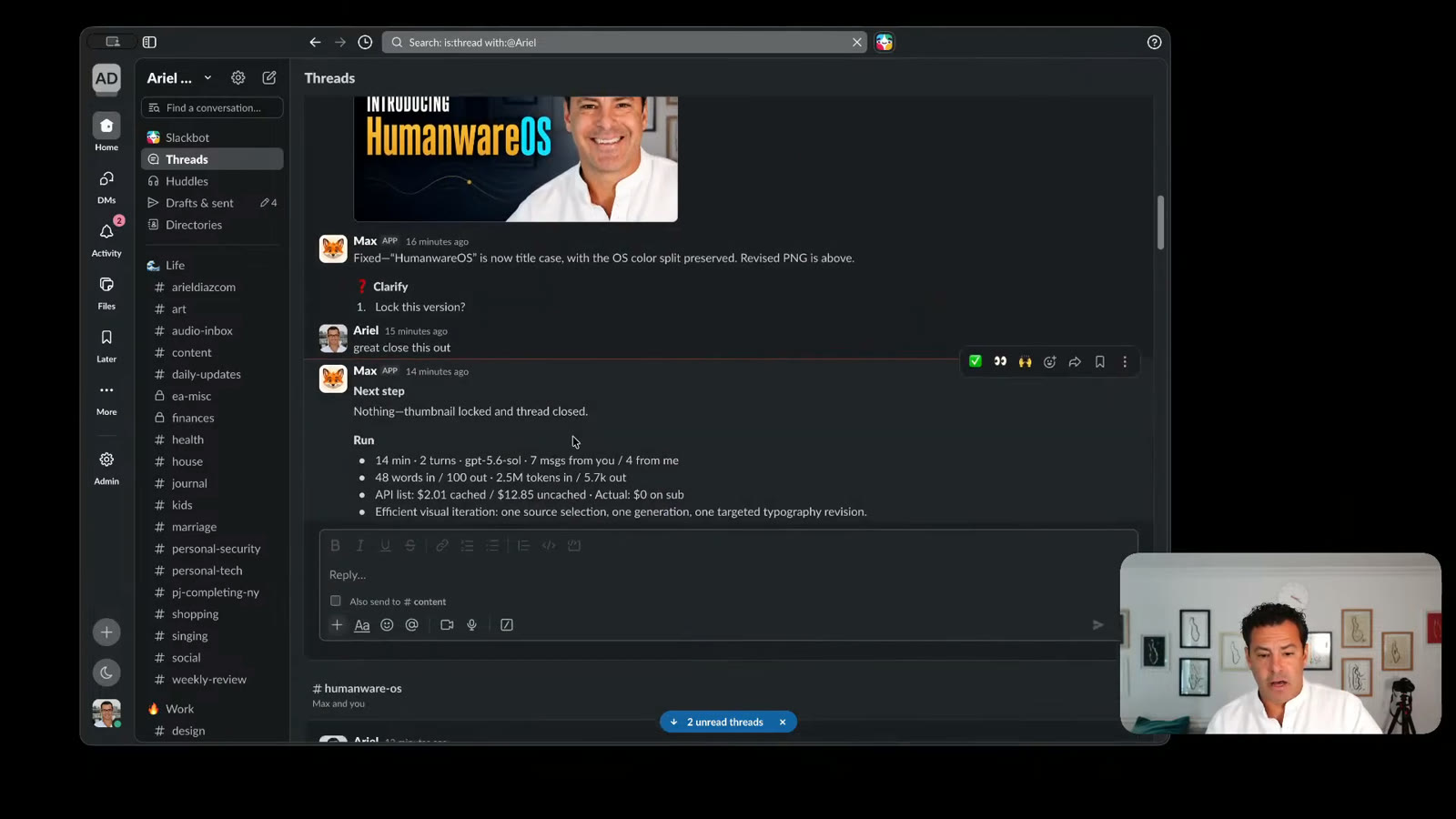
Slack had already solved this problem at my previous companies. Channels carry context, threads separate parallel work, notifications return attention at the right moment, and status stays visible to the whole team. HumanwareOS makes Slack the control plane for an agent team.
Vision
Context engineering for humans
We have become good at engineering context for agents while leaving the human to reconstruct everything manually. The human-first version puts mental load, team status, notifications, thread visibility, and channel context in one place so parallel work does not become chaos.
The system is intentionally personal and opinionated, but it avoids lock in. Agent definitions and memory live in portable Markdown and Git. Any harness or model can plug in—including local models for privacy, cost, and honest benchmarking. The long-term question is not only what models can do, but where the durable value accrues.
Conceptual model from the talk—not a measured performance claim.
Demo
The system runs the work—and helps build itself
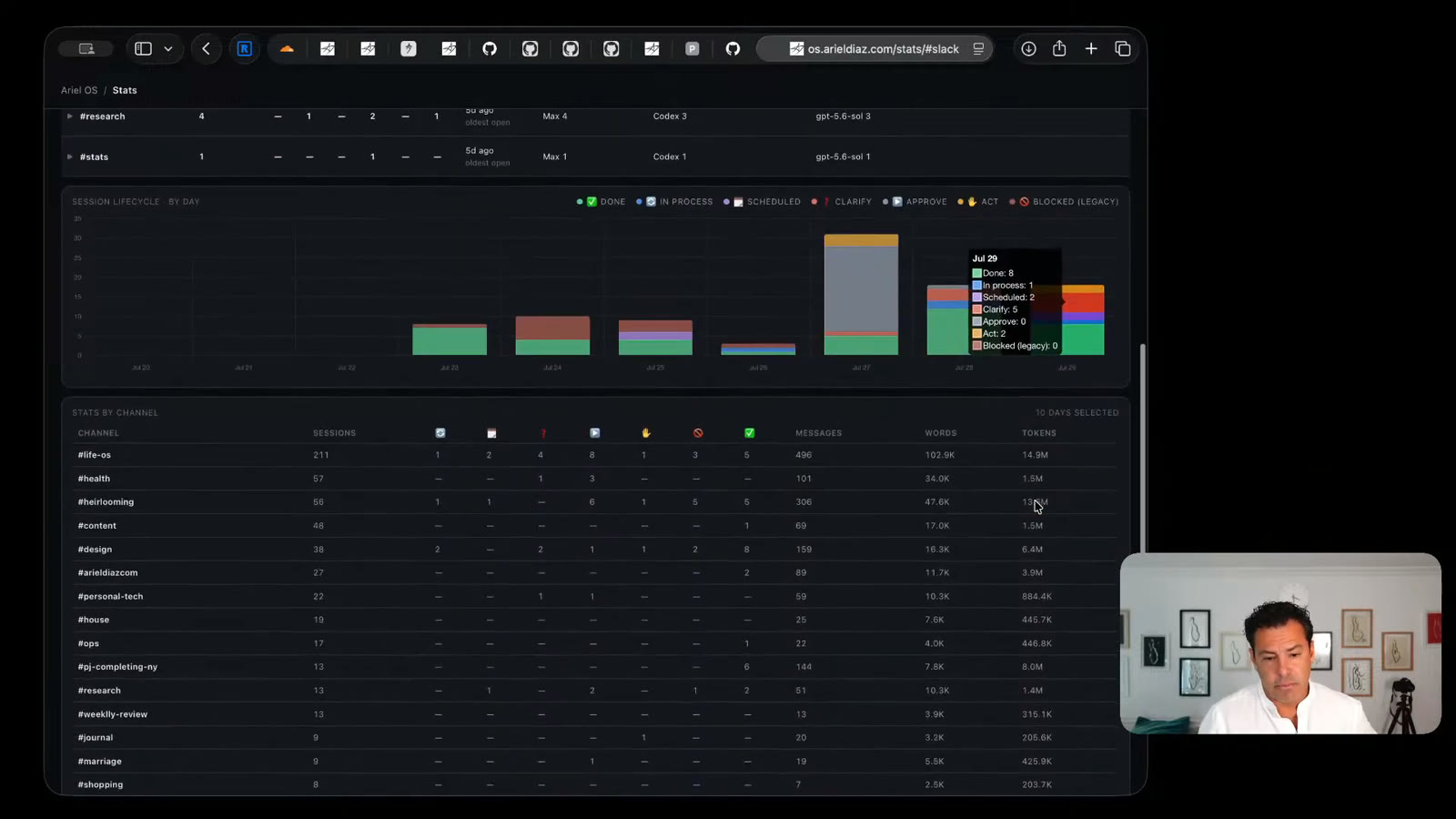
In the walkthrough I use HumanwareOS for coding, other company work, the ArielDiaz.com rebuild, and the system's own operations. The same surface exposes sessions, security, token use, model activity, and shareable artifacts instead of hiding the machinery in terminal windows.
Artifacts
Internal references that can become public links
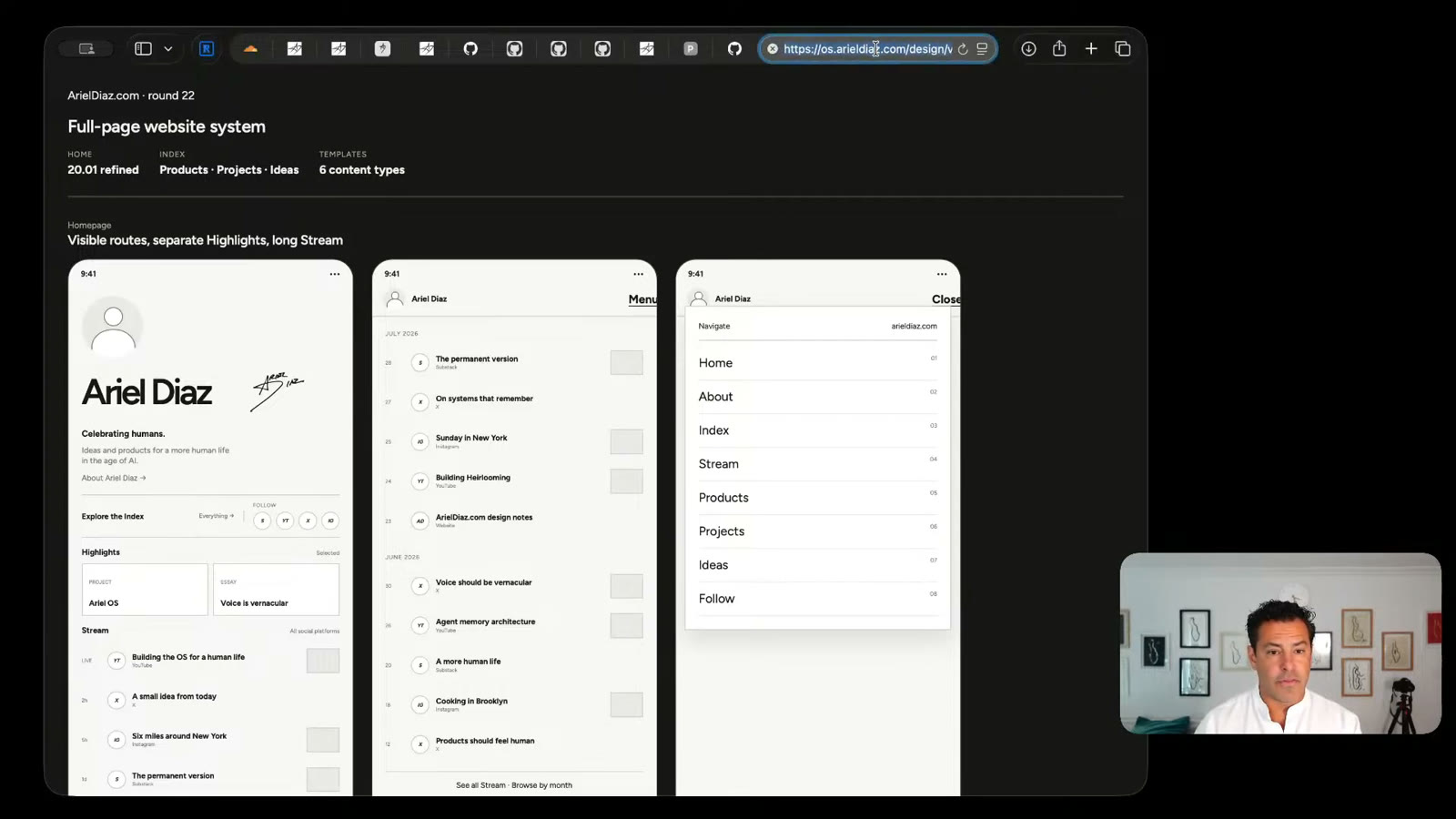
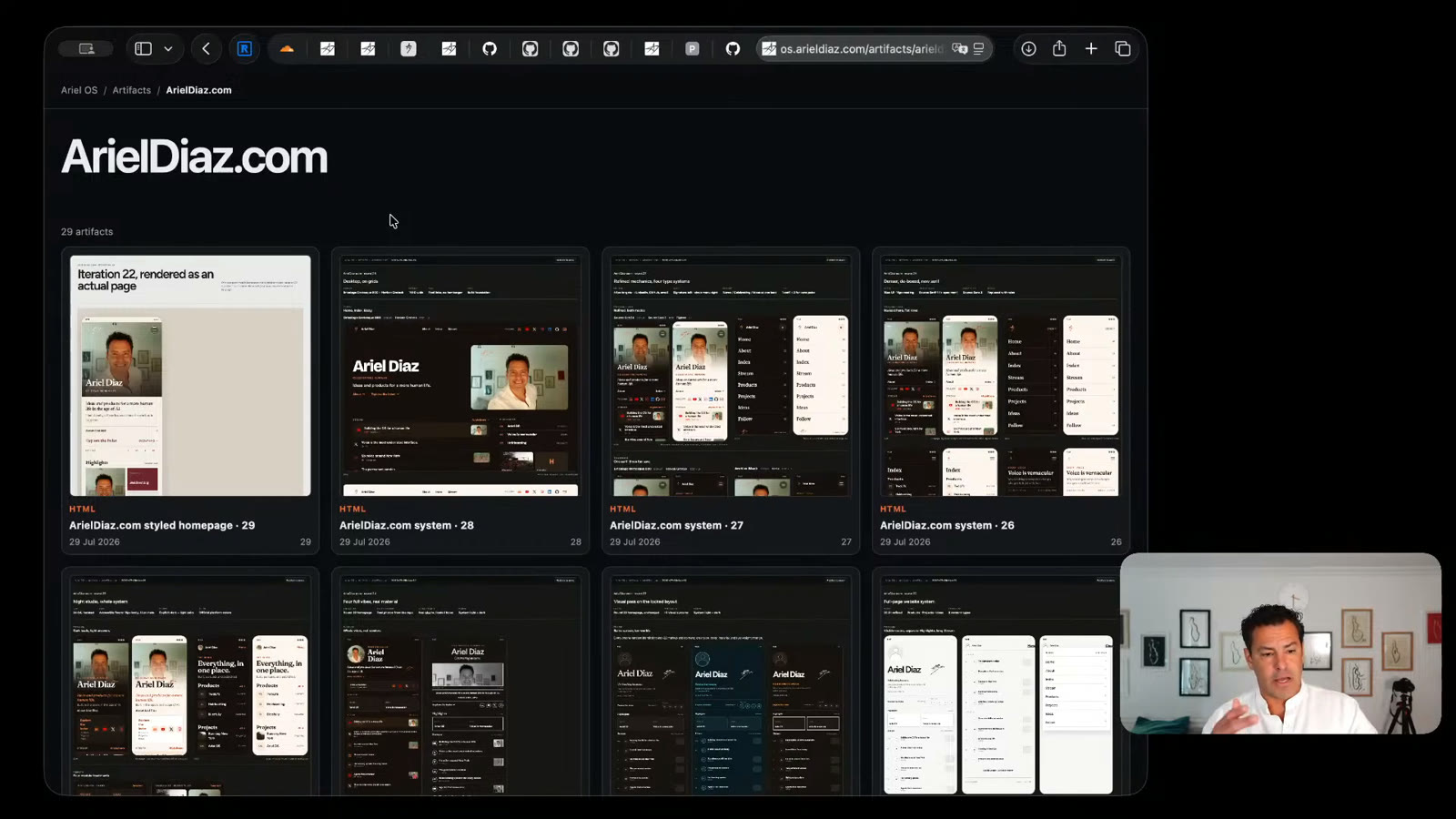
Agent output does not have to disappear inside a session. HumanwareOS keeps artifacts in a browsable archive, then lets selected work move from the private Mac mini to a public GitHub-backed web page.
Watch this section from 20:56 ↗
Key features
Life and work stay distinct without becoming disconnected
Liv owns personal life; Max owns work. That duality is a deliberate information architecture—two complementary agents, like zero and one, yin and yang, or the distinctions that make information possible. Their shared memory preserves continuity without collapsing every context into one voice.
Slack reactions form a compact information system: lifecycle status, agent, harness, and model are visible at a glance. Integrations connect the same conversational surface to tools, while artifacts can be published directly to the web instead of trapped inside a chat.
Tech architecture
A portable stack, centered on the human
Tech details
Framework, products, and running cost are separate layers
HumanwareOS is the overall operating model. OpenClaw is the runtime; Slack, Tailscale, Cloudflare, Doppler, GitHub, model providers, and local hardware are replaceable products around it. That separation keeps the framework understandable and the system portable.
The up-front cost is primarily the Mac mini and any existing laptop. Monthly cost depends on the mix of Slack and developer-tool plans, hosted model subscriptions or API usage, and optional infrastructure. Local models trade hardware and electricity for privacy, predictable marginal cost, and a useful benchmark against cloud systems.
Watch the ideas
Key moments
The problem · 0:50
Technology finally works for us
“For tech, most of the time, we have to work for tech… But now, the computers speak our language.”
The interface · 7:29
Slack as the breakthrough
“Slack has spent years—decade plus at this point—building a refined user experience for how people work.”
The thesis · 27:19
Humans remain in the orchestration layer
“Humans are still going to be an important part of that orchestration layer—from a taste standpoint, from a priority standpoint.”
Why it matters · 28:17
Humans care about humans
“No matter how good the technology is, humans care about other humans… and they care about being a better human.”
Full record
Transcript
Machine-transcribed locally with Whisper; it may contain errors. Timestamps open the original YouTube video.
Read the full transcript
Intro
0:19 All right. Here we go. We got everything going. So first of all, I'm Ariel Diaz. I'm a serial technology entrepreneur. I've been building software and a bunch of other products for 15, 20 years. And obviously, as everybody knows, this is the most fun time to be building... Move my microphone up a little. The most fun time to be building software. And it's the most fun time to be building software and using software because tech, for the first time, works for us.
0:56 For tech, most of the time, we have to work for tech. We have to learn some language, some coding, some terminal, and some new metaphor. But now, the computers speak our language, which I talked about last time in the voice's vernacular. So today, I want to introduce this new project I've been working on, like everybody else. It's called Humanware OS. And it focuses primarily on the context engineering and cognitive overhead of managing so many AI sessions.
1:25 So AI makes us so much more productive, but the bottleneck is still what you can hold in your head, what you can manage at the same time concurrently. So that's what I want to walk through.
Challenge
1:36 And first, I'll start with the challenge. Again, this story is... Everybody's building this. I don't think I'm unique, but I thought I'm challenging myself to get this out there. And I built this, again, in service of myself and the other projects I'm working on. So the challenges with traditional tools. First is you have some pretty nice single-player mode tools, obviously, the chat interface. And you have some pretty solid team-wide AI tools and infrastructure.
2:03 But the problem with the single-player mode tools is you lose context very quickly. You have too many chats, too many projects, too many work. And I found it really difficult to manage dozens of sessions in Cloud Code and Codex at the same time with a limited amount of notifications, a limited amount of visual awareness of what's happening. And I just felt like I was constantly context switching. I tried a bunch of tools, Conductor and Superset, which help you manage parallel coding environments and sessions, especially with work trees.
2:36 I found them helpful and better than the native Codex or Cloud Code apps because it felt more efficient to manage multiple coding sessions. But it was kind of limited to that. And one worked over SSH, one didn't. And, you know, it was kind of a little limiting. Then I got obsessed for a few weeks with Paperclip. Paperclipping, I think, is the website. I'll put some links in there. So I got obsessed with Paperclip because the mental model and the agent model with Paperclip was an org structure.
3:14 And I'm a three-time founder CEO. I've started other projects and companies beyond that. And an org structure made a lot of sense for me to think about how to structure agents. Because what are agents? Agents are a skill set, a set of permissions, a set of context. And you execute that. And then you do the results. And an org is that, right? You have a set of permissions and authority. You have a set of skills.
3:40 You have a set of tools that you use. A set of, you know, interfaces and interactions that you have. And you know who to give a given task to simply by their title in most instances. Especially if you're the CEO, you kind of have to. And, you know, if I'm going to run a new marketing campaign, then I'm going to give it to the marketing manager, not the CMO. If we already have established the brand and the audience and everything else.
4:04 Versus if we're trying to redefine our brand, obviously we need the CMO and the designer. So, thinking about managing projects in the context of an org structure made a ton of sense to me. So, Paperclip has that mental model. And I spun it up on the Mac Mini. And I started working on doing some projects. And I came across a few kind of key problems. One is it kind of spun up too many tasks too quickly.
4:32 Which was just harder to follow. I didn't like the document model. It's a, it's a, all the documents live on tasks. Which felt weird to me versus kind of living in their own independent spot. So, it was an abstraction. And I'm all for abstraction if it's the right level of abstraction. And this one didn't feel like it was quite the right level of abstraction. So, get some water. So, I fell out of love with Paperclip.
5:02 But as I was using it, I learned a lot about the structure and the different frameworks. And everything is evolving so quickly. You know, this is now July 29th. And I put on cringe in a few months when this is woefully out of date. But the mental model and the soul and the culture felt, you know, opinionated. Which I appreciated. But a different opinion than what I wanted. And one of them that I'll kind of do a little mini rabbit hole on.
5:28 One of the lines in one of the agent configurations was, never ask a human to do what an agent can do. Which reminds me of The Matrix. My favorite movie of all time. And, you know, don't send a, there's a great quote from Agent Smith. Never send a human to do an agent's job. And I don't know if it's intentional for Paperclip. I assume, I hope it is. It's a nice little nod.
5:51 But I'm on Team Human. So I'm like, dodge this Paperclip. And then I'm saying, that's not the culture I want. I want to have very close contact with the decisions we're making. The sequencing. The fidelity. And so that wasn't for me. I love the vision. And nothing else. But it wasn't for me. So, then I was like, well, I'm just going to build my own Notion workflow. And I started building, you know, the Kanban and the details and the interface.
6:21 And it just was so much friction. So I was like, ah. I kept trying stuff. And then I'm sitting there trying to parallel process. Build a few products and apps, which I'll be releasing pretty soon. While building the system that builds the apps, right? Like the machine that builds the machine. And I just had so much friction that I kept going back and forth between do I optimize my machine that's making the machine or do I work on the machine?
6:48 And it felt like, well, the tech is moving so fast that if I just step back for a couple of weeks, I'll be moving much faster. And that's where I landed, which is amazing. So, again, this video is like as much for me as it is for anyone else. Organize some of my thoughts. Organize this project. Land it. Put it out there. But mainly I've already won because this is making me more productive than I've ever been.
7:11 And you'll see in the demo. But it feels like I have a 20 or 30 person team. I mean, I've managed teams that size and bigger as a CEO. And that's what it feels like. I can just go and speak to the computer and kick off a bunch of tasks without this cognitive overhead of like where was I? What's happening? What's the status? Do I have to keep the plate spinning? And the breakthrough solution, which is obvious.
7:33 Everyone's going to have this breakthrough, including Jack Dorsey, who introduced Buzz like yesterday or today.
Solution: Slack
7:39 But the breakthrough is using Slack as the human interface. Slack has spent years, decade plus at this point, building a refined user experience for how people work. And how humans work, right? And what's the context for? What's the notification? Amazing notification system. Amazing threading and context. Amazing context through channels and what you're aware of. Integration with anything you want. So, that was really the solution, the breakthrough. And that enabled me to work on something that was like human-centric.
8:15 I didn't have to learn a new language.
Vision
8:16 I just been on a bunch of Slack teams. So, now I run everything through Slack. And again, I'll do some demos. And it's just been amazing because I can jump ahead and do a bunch of different parallel sessions without just kind of being overwhelmed cognitively. It's very opinionated. It's very, again, it's custom. And the irony with AI is that anyone can build something that's for them. The question is, do we have, there's a great Onion article that the Middle East peace solution is defined with 317 million states.
8:53 And sometimes it feels like that's the direction that AI is going. That we're going to end up having, everyone's going to build their own software. And everyone's going to want everyone else to use it because they think it's so good, but it's so good for them. So, this might end up in that trap, but it's great for me so far. The other factors that I had in terms of what I wanted to build something, I wanted to build something that was platform agnostic.
9:14 So, with no vendor lock-in and no model lock-in. Because, you know, there was something that I preferred with Codex and Cloud or Codex and GPT 5.6. Sometimes I prefer Cloud Code and Fable. Sometimes I have a Mac Mini that I want to see what it's capable of. I know it'll be different, but for some high privacy things, that's important. So, I wanted to be able to use any model, any harness. I wanted to manage a bunch of different projects.
9:40 Some of them more work-related for my companies. Some of them more personal. Some of them more family. Some of them have different groups of third-party outsiders into this Slack community, into this now Slack community. And so, that was some of the constraints. So, now, with that, again, the high-level thing. So, what I've built, as many others have, is a Slack-first interface that runs on OpenClaw. That have two defined agents that I've defined.
10:11 Runs on OpenClaw and interfaces with Cloud, ChatGPT, OpenCode, and OpenRouter. And then gets me all the roles back through Slack. So, let me... That's the context. Next. Now, because a bunch of people have been asking for this, let's jump in. So, I'm still getting better at my OBS studio management. So, that's why I got to look down.
Demo
10:33 Okay, let's start with Slack. Here we go. Okay, cool. So, now... All right. Perfect. So, this is now... I'm just going to... I'm literally walking through what I'm building right now using the tool to get a real demo. It's not a theoretical thing. So, earlier today, I've got a content channel. That's what I'm doing this current YouTube thing for. And I was like, you know what? I need a... I need a thumbnail.
11:01 So, I took a couple of screenshots and said, hey, can you give me one? Great. Humanware. Actually, you know, it's... We don't... We only... We don't do all caps. Great. Ship it. Locked. Then what this does is, you can see I have this emoji language. One of the great things about Slack. And I basically have a status emoji. I have four status. Complete. A question that's expected of me. Which is a question mark.
11:25 Something I have to do as a human. Like a key into Doppler. Or just a status like, hey, this session's running. No action needed. It's who's doing it. I have two agents. Liv and Max. Liv is my personal chief of staff. She's a blue butterfly. She's kind of always around me. Max is an orange-red fox. He's the CEO of my companies and projects. And this one is using Cloud Code and Sol.
11:52 Sorry, Codex and Sol. And you can see... So there. That's a pretty easy thread. Done. And I get a quick... A little brief summary at the end of each thread. And each thread is equivalent to one session. But the thing is, it doesn't have to be only coding. Again, this is a little marketing task. Because the thing that I ran into before is if every... And even if you do work in the folders, I think folders as a metaphor are going away.
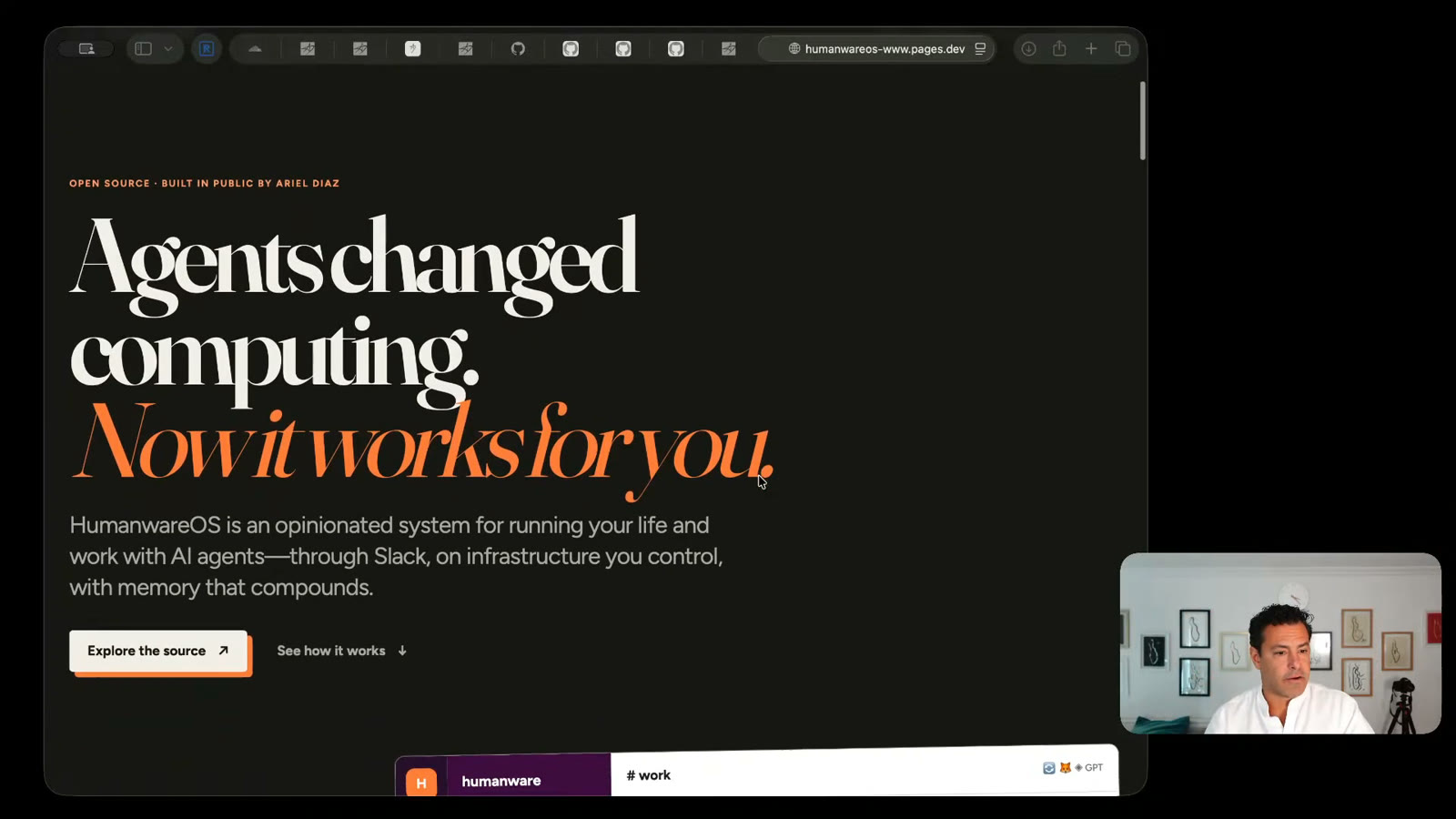
12:17 And everyone's been trying to figure out what comes after file folders. And so even working in folders, fine. It's not great. I don't love Google Docs and Drive. I definitely don't like the Microsoft ecosystem. So I've just been like kind of trying to figure that out. So now another one. So now I said, great for humanware. We got to do a website. I just got this humanware OS domain on Cloudflare. And I'll come back to this.
12:44 It's not as distracting. But yeah, here we go. Okay, cool. I'll show you. So anyway, so we got... Hey, here's this outline. This is the outline of this video I'm walking through now. Right? Some intro to the challenge. What the vision was. The demo building itself. And then I'm going to walk through some of the key features. And then I'll come back to the actual architecture that this is all running on.
13:07 Boom. So now Max, he gives me a little preview with the repo. It's on GitHub. And all this is... Because all these are pre-connected. And this is not... I mean, it's not rocket science. A lot of people are doing this. I'm not saying this is the most unique thing in the world. But it works very well for me. And it's pretty opinionated for my framework. So now let's go ahead and change my window to Safari.
13:32 So this is what, with that outline, what Max created for me. Okay. Now it works for you. Okay. It's not bad. Again, I haven't... This, I give a very, very, very light thing. This would have a few iterations for sure. And it's a little light. Quite okay. We're going to have some iterations on it. Decent attempt at a little thing. Cool. I don't love this font. But, you know, I'm still working on the...
14:05 On my kind of unified design language. But what I also did... So this is Max running on ChatGPT. So, but I also had Liv, my other agent, who runs on CodeX... Sorry, on Cloud Code, do another version. So let's see what she's done. I'm clicking it through her version. So now... Oh, no. That's the wrong one. Repo is live. What's the website? Let me ask her now. So now I'll go back to Slack.
14:40 So she did this, and she put it inside the repo. Oh, she was too aggressive. This is the other thing. So they have different styles. So Max deployed it to Cloudflare, but not connected to the domain, which... I think she might have done it too. Okay. Yeah. Pushed. Oh, got it. Okay. So they're working on the same thing. I actually wanted a different design. My bad. So right now, they actually were working on the same exact thing.
15:35 I kind of wanted just them to do a draft design thread first. Oh, and I usually type, but I'm... Or speak. If you can... If you can take a pass and just put it in our artifacts. Okay. So anyways, that's that. And the framework here is I've got a series of things of work. These are products I'm building all in service of humans and humanity. Some of these I'll come back to.
16:12 And then I've got a series of life things. So my personal website, some art projects, some journaling, weekly update. This weekly update's amazing. So now through the system, every week, this is some historical things. So every week, I have a simple week number. Obviously, it's on me. Each one of those weeks has the weekly notes, which is an internal Slack. It's a Slack canvas that then at the start of the week is pre-populated by Markdown file and at the end goes back into Markdown.
16:45 So I have that in here, which is a nice interface. Or you can see I get a little preview. This is what I'm working on. I'm working on some public tentpoles, including some music, some artsy stuff, some testing different cameras, getting one of the products. So that's the goal. And I generated this entire weekly deeper list with a 30-minute exploration, audio exploration on my iPhone while drinking a coffee on a Monday morning, which I know is becoming more and more common.
17:16 But the point is now I have somewhere to go to put it. It's not like in some app. And more and more, you know, I used to run 20, 30 apps at a given time. Now everything is pretty much running through Slack. So that's the high level. I'm trying to think what other – oh, yes. So the other thing that's cool. Okay, so this is now – I'll move that. The interface through Slack again.
17:41 Different channels. Each thread is one. So you can see I'm also working on – this is another example. So I'm working on updating my personal website. And in here, right, we have our thread. And I can see the status. This one's still running. This one's done. So there's – my first phase one was let's do some iteration on the actual, like, hierarchy. So I had them do this. And this is now – let me switch back to Safari.
18:12 So now this is an artifact that we can do. And we've done 22 iterations of this particular version, which has, like, a stream and different concepts for the personal site, which is pretty cool. And this is all part of this – what I call kind of the OS.arial – in this case, my domain. But it's designed to work on any domain. So OS is all the internal stuff. There's the security page, which essentially – so all this – because it's all living on the Mac Mini, I want to understand what's the traffic in and out, what are the processes.
18:44 There's a lot of automation happening and a lot of permission that the agents have. So I need to understand what that looks like. I've got stats, which is looking at not just my summary and tokens, but also across all the Slack activity, the number of words. You can see it's like this is ramped up in the last week that it's finally landed. And I can see the number of threads by status by channel.
19:08 So, again, keep a quick pause. We've got four in process, four scheduled. That's the other status I forgot to mention earlier is that you can have a scheduled, which means the thread is not closed. It's got some automated cron to basically reawaken and do something. That might be something like we want to wait another month to do some – to see how this open source software develops. It might be, you know, this is blocked by something else, but, you know, I know it's going to be a while.
19:33 Or just let's just take a look in a few months. Questions are those that are on me to clarify. This state we ended up killing because it was a recommend approval state, but the agents kept confusing approve and quest clarity questions. They kept being overly aggressive, like, just approve this. And I'm like, there's a million questions still. So now they recommend approval inside the clarify question. Like, here are some questions that I recommend approval.
19:58 And then I can be like, either let me answer it or just approve it. And then act. So this is something I actually have to do increasingly. So this is the interesting part. Like, what do humans actually do? What do you do anymore? And, I mean, the things that are on me to act are, like, you know, by domain. And even that is probably automated soon. Or, like, a lot of key management and security management, which I'm going to come back to on, like, the personal stuff.
20:21 And then blocked is also going away because it was too – so blocked is either, like, I have to physically do something or, like, physical or digital. But I must do something. Questions I have to clarify something. Scheduled, in progress, or done. Again, these two are – we're sunsetting. And then I can track, like, all the sessions. So in a given – I mean, the scale here is – this is 30, right?
20:42 So, like, July 27th, I, like – this is the number created by day and then the status, right? So they – over time, they should get more and more green. But, like, any given day, I'm spinning up, you know, 15 – or managing multiple because some of these are multi-day threads. But I can spin up 30 threads and not, you know, miss a beat and work on a bunch of different stuff in parallel.
21:02 So that's some of the operating system. And then the other thing that we can do in here is – that's the stats, security, just some design style. Then this links to some other stuff. But the other thing that – so in the previous Slack, I said, hey, build this example wireframe. And where that lives is here we've got these artifacts. And each artifact that is created basically gets a permanent or, you know, semi-permanent record.
21:36 So I can see the full exploration. And I built this because whenever I would do this before, it was just always, where did this thing go? You know, some – you know, Claude is showing me a preview in HTML. It lives in the session, super buried. I'm like, where is it? And I have kind of, like, lost – and, like, it's just a lot of management. Whereas now, I can just spin up artifact after artifact.
21:58 I can go back and say, oh, I like this one that was, like, X versions ago. I can reference it. Each one of these are their own thing, right? So I can look at, okay, here's, you know, some early things. I can give feedback on the style. There's a whole header, right? And this lives at os.arields.com, which is private. But if I publish it – so this os.arields.com runs on my Mac Mini.
22:22 If I publish it, it'll push it to my www.arields.com, which is a GitHub repo, which will then publish it. And in one click, make this instantly publicly shareable, which is nice. And I'm doing something similar for video. I'm also working on a provenance-focused audit log. So, like, all the videos that I create, which are human, are going to be verified to be human. And this relates to this security model I'm working on, which is, you know, security is essentially identity and integrity.
22:48 Are you who you say you are? And are you – can we actually do – do you have the authority to do what you're asking for, right? And so this identity, integrity – or sorry, it's do you have access to do the things you have? And then are you authorized to do, right? Access, authorization is another – I'm finalizing the language. But essentially, I want to prove both, right? So CloudFlares and arields.com is one way to verify authenticity.
23:16 But another way is a video that, you know, is verified. And people are getting better at the cryptographic verification that's real, not AI video.
Key features
23:27 So I don't want to cover anything else. Yes. Okay, cool. So now let me switch back to – okay, I'm going to just – let me go back to Slack for a sec and then go through – hold on. Perfect timing. Okay, 23. So here, again, I mentioned before the duality. So life is a blue ocean and that's live. She's blue. And then work is fire and orange and, you know, we make fire to work and that's max.
24:00 And I just kind of like – I love the duality of life and various dualities, right? Yin and yang, light and dark. And so – and then it also helped me figure out – and they each run on default on different models, although they can run on any models. But it helped me figure out, okay, who is this for? What are the contexts they have? What are the memories? How do they evolve?
24:20 And I have kind of a go-to point person. And also figuring out like how many – I only have two agents right now because, you know, they can wear a lot of hats through skills. But I found that just the right level of interface that I wanted is I know who to go to with each thing and then they can then coordinate a bunch of activities with subtasks and on their own based on what we're trying to accomplish.
24:51 And then integration, which I didn't get into, but, you know, through OpenClaw and Slack, it's pretty trivial to get any integration going. Cool. So now I don't yet have a good – I don't yet have a great visual when I am working on this. But what I will do is I'll kind of walk through the initial website. So I don't know. Okay. So now – okay.
Tech architecture
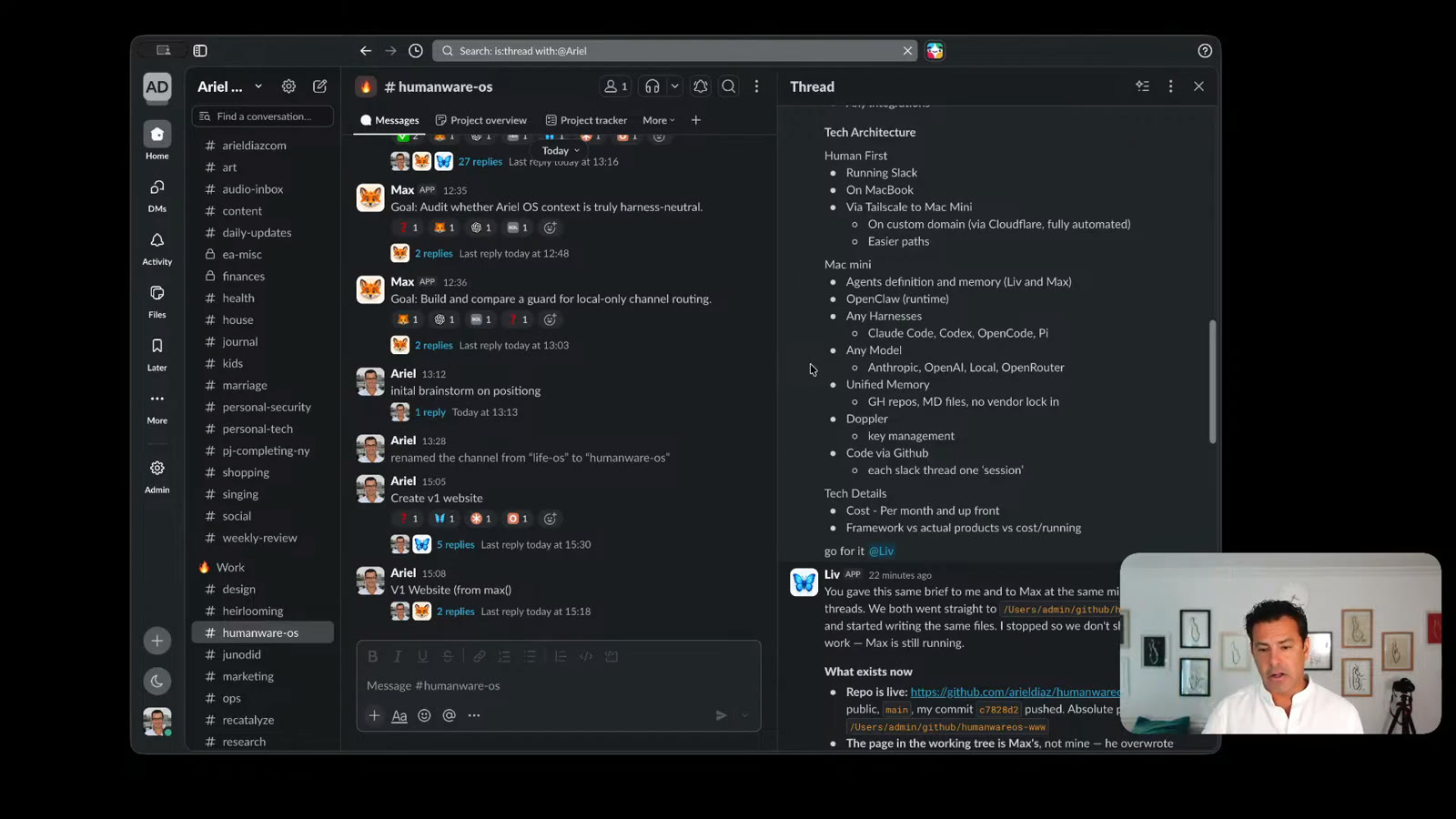
25:18 So this is the tech architecture. So I imagine it's human first on the MacBook. So everything I do is on running on the MacBook as an interface to me. But all the work is happening on the Mac Mini, which is at home right now, but in general it can be anywhere. Access via Tailscale, so it's secure. And you saw that domain. It's the ArialDS domain on Cloudflare. That also enables me to make just easier paths and host my own sites, not just through GitHub.
25:50 And then the structure is basically the agents are – live and match are defined and their memory is outside of any individual, you know, thing, right? It's not a Hermes agent. It's an agent that can live anywhere. The runtime is OpenClaw, which I have been very, very pleased with. And then it can coordinate, as you saw with the emojis on a given thread, right? Because, again, every thread gets its own status, agent, harness, model.
26:19 And then – so that's the task execution. And then there's unified memory. So at the end of every session, there's a summary output inline, a markdown file. We compound any learnings. And then that goes into our unified memory. I use Doppler for key management. Obviously, GitHub for code, although I'm excited to test out Buzz and their integrated Slack slash GitHub, which I'm absolutely going to try. And maybe I'll – it's the same mental model.
26:42 Whether it's Slack or Buzz, it's less critical.
Tech details
26:45 And then, you know, the cost is, you know, I do pay for Slack because I want the history. If not, I could theoretically export it. Obviously, the AI that you pay for. But most of the other stuff is, you know, there's a ton of open source that I'm using. So there's very few things that are, you know, that cost anything here. And this is now my personal management. But for the work stuff, obviously, this informs a lot of what we're building.
27:09 The architecture is obviously very different because it's not going to be on a Mac Mini. But just the ability to understand end-to-end what's happening. And that's kind of what I'll end on. So what I'll end on is just my – the thoughts, right? I mean, this has been firehosing AI, obviously, for the last months, for less – longer than that. But I feel like there's been an inflection a few months ago where the pieces started coming in place.
27:35 The agents had enough autonomy. They had enough context. The mental model started sinking in. And it kind of started looking very close to how I think about using technology and managing companies as a CEO. So it was super exciting because now it's not about, you know, tweaking prompt engineering, which is where we were a year ago. Instead, it's now about orchestrating activity. And I believe humans are still going to be an important part of that orchestration layer, right, from a taste standpoint, from a priority standpoint, from whether it's artistic taste or product taste or market taste.
28:07 And we'll probably have an AI agent-to-agent economy that might scale larger than the human economy. But the human-to-human economy is there, right? And one analogy, humans care about humans. And that's always going to be the case. No matter how good the technology is, humans care about other humans, cheering for other humans, and they care about being a better human, right? And that's why we watch people run 26 miles slowly or whether they could do that in a car, right, and go way faster.
28:36 And we cheer on people that break two hours, even though that's trivial on a bike, let alone a car. Same thing. Like, their algorithms will beat any human in chess. But we care about Magnus Carlsen. And we cheer him on. And because it's about the human struggle and endeavor. And that, I believe, will always be there. Whether we have agents doing a lot of the work, which I think is amazing, or not.
28:57 So the agents are here to stay. I think the AI is not going to replace us. I think it's going to, I hope it doesn't. And that's the team I'm on, right? How do we make sure, like, how do we be more human in the age of AI? And this has certainly enabled me to be more productive, build more of these side projects, build tools for other humans. This is what I'm working, the primary theme of the stuff I'm working on now.
29:21 And it's a lot of fun. So this is a humanware OS. Again, it is open source. The site will be up very shortly, as we saw. And I'll keep describing it. All right.